IRATEMONK - WICKEDVICAR
Introduction
WICKEDVICAR is the cover name of a component for remote installation and management of an IRATEMONK firmware implant from a Windows host operating system (OS). Although, as detailed in IRATEMONK, other OSs are supported by the firmware implant itself, only Windows is known to have a component for installing and managing the implant remotely. The earliest source implying the existence of WICKEDVICAR is a page from the ANT catalogue, dated 20 June 20081:
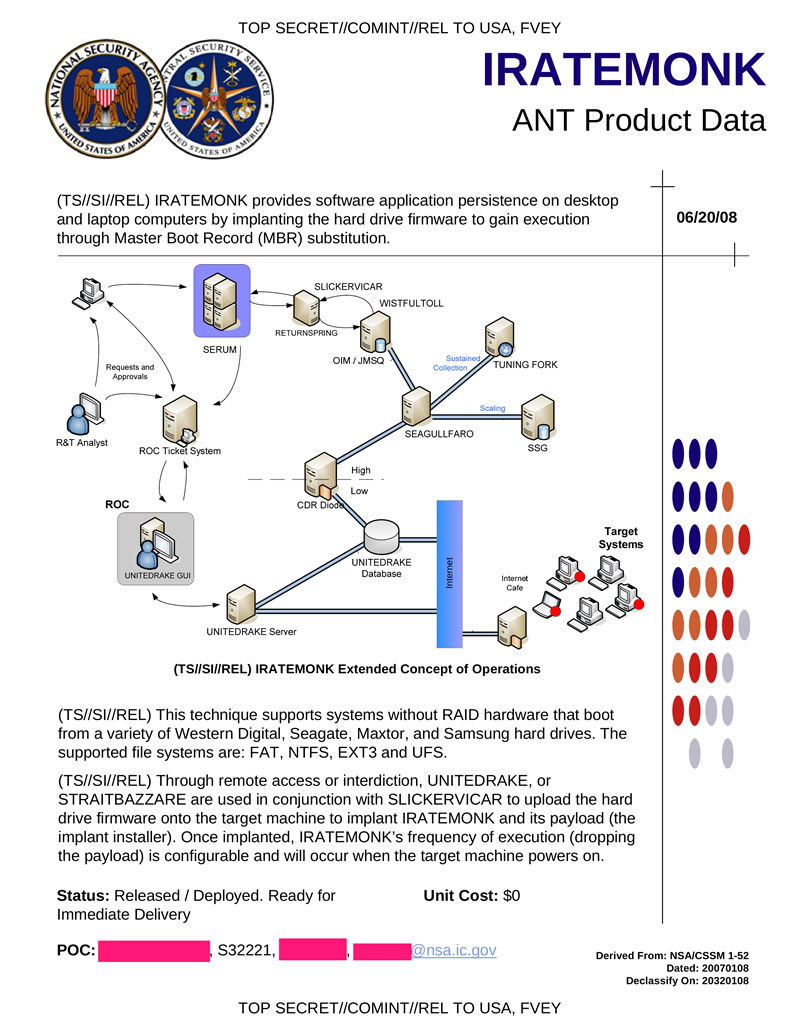
Although the name WICKEDVICAR is not used here (only its driver SLICKERVICAR), details relevant to it are included. It’s described as a module for UNITEDRAKE (a.k.a. EquationDrug and GrayFish2) and STRAITBIZARRE (a.k.a. SBZ3, misspelled on the page as STRAITBAZZARE). Its stated purpose is to upload the hard drive firmware onto the target machine to implant IRATEMONK and its payload.
The other internal NSA document relevant to WICKEDVICAR, and the only one explicitly referring to it by name, is a wiki page of project ideas for the Persistence Division. This document is introduced further in IRATEMONK, including heuristics dating it from roughly mid-2011 to mid-2012. Here WICKEDVICAR is described as used to perform remote survey and installation and interacting with the firmware implant from a Windows OS:

The above documents may be the only internal NSA resources related to this tool. However, there’s an additional external source from antivirus vendor Kaspersky dated 2015, a threat intelligence report. In this report, Kaspersky described two versions of a malware component used to reprogram the firmware of HDDs and SSDs, with the filename nls_933w.dll.
Version 3.0.1 is a 32-bit DLL module for UNITEDRAKE version 3 (a.k.a. EquationDrug2) with compile date Jun 15 2010, and supports drives of the following types:
| Strings | World Wide Name OUIs | Architecture | Type |
|---|---|---|---|
| ST, Maxtor STM | Seagate Technology | Seagate (ST10) | HDD |
| Maxtor | Maxtor | HDD | |
| WDC WD | Western Digital Technologies | Western Digital (WDC MCU) | HDD |
| WDC WD | Western Digital Technologies | Western Digital (Marvell) | HDD |
| SAMSUNG | Samsung Electronics | Samsung (pre-Trinity) | HDD |
| Seagate Technology | Seagate (F3) | HDD |
Version 4.2.0 is a 64-bit DLL module for UNITEDRAKE version 4 (a.k.a. GrayFish2) with compile date May 14 20134. It supports all the drive types of 3.0.1 as well as several additional types:
| Strings | World Wide Name OUIs | Architecture | Type |
|---|---|---|---|
| IC, IBM, Hitachi, HTS, HTE, HDS, HDT, ExcelStor | HGST | IBM | HDD |
| HGST, Toshiba Corporation | Hitachi (ARM) | HDD | |
| Samsung Electronics, Seagate Technology | Samsung (Trinity) | HDD | |
| Toshiba M | Toshiba Corporation | Toshiba | HDD |
| C300, M4 | Micron Technology | Marvell (Van Gogh) | SSD |
| OCZ, OWC, Corsair, Mushkin | SandForce | SSD |
Of the two versions detailed above, only the earlier 3.0.1 has a sample publicly available5 (password infected), so that version will be the subject of reverse engineering. This module contains all high-level logic for installing and managing a firmware implant, executing ATA commands through an interface provided by SLICKERVICAR, a driver contained within the module as a PE resource.
The sample makes heavy use of complex C++ class hierarchies and has strings encrypted with a custom cipher, but is otherwise unobfuscated. The specific algorithm used for string encryption is named MixText within a script in the Shadow Brokers dumps6.
The module exports five separate ordinals for use by the UNITEDRAKE version 3 platform it targets. Descriptions of each are provided below:
- Returns a pointer to the operations request handler function.
- Receives function pointers for malloc and realloc implementations used to allocate response data, and RC5-CFB-decrypts a string table resource used internally.
- Returns 1.
- Initialises the structure pointer passed as a parameter with the module version 3.0.1.
- Initialises the structure pointer passed as a parameter with the value
0x80AB, one greater than the module ID0x80AA.
Of these, ordinal 1 is the most important, returning the operations request handler function used for all module functionality.
Drive Types
The following are the drive types supported by this module and their associated ID numbers. A link to a page with details on how the drive type is implemented is included where available.
| ID | Description |
|---|---|
0x132 |
Seagate (ST10) |
0x133 |
Maxtor |
0x134 |
Western Digital (WDC MCU) |
0x135 |
Western Digital (Marvell) |
0x136 |
Samsung (pre-Trinity) |
0x13A |
Seagate (F3) |
In addition to the above values, the ID 0x131 is used as a default case for a drive not supported by any drive type.
Drive Types - Drive Type Class
Each of the above drive types implements a drive type class with the following methods:
| Signature | Description |
|---|---|
unsigned int MatchDrive(DriveInfo* info, DriveAddress* address) |
Returns 0 if the drive is supported, otherwise an error code |
Drive* CreateDrive(DriveInfo* info, DriveAddress* address) |
Creates an instance of the associated drive class |
Each of the above methods takes a DriveInfo object with ATA 0xEC IDENTIFY DEVICE data, and a DriveAddress object with a storage controller index and channel.
Drive Types - Drive Class
Each drive type also has a corresponding drive class with implementations of the following methods, several of which operate on the drive’s System Area (SA):
| Signature | Description |
|---|---|
unsigned int ReadInfo(void) |
Read and store vendor-specific drive information |
unsigned int ReadSA(unsigned int address, unsigned int sector, unsigned int sectorCount, void* data) |
Read data at sector offset of type-specific address in the drive SA |
unsigned int WriteSA(unsigned int address, unsigned int sector, unsigned int sectorCount, void* data) |
Write data at sector offset of type-specific address in the drive SA |
unsigned int WriteResources(void* data, size_t size) |
Parse type-specific container to write various firmware/system resources to the drive |
unsigned int ReadResources(void** data, size_t* size) |
Read various firmware/system resources from the drive to a type-specific container |
unsigned int SAStorageLocation(SAStorageLocation* info) |
Get location (address, sector, sector count) of the SA storage metadata header in the SA |
unsigned short TypeID(void) |
Return 16-bit drive type ID number |
size_t InfoSize(void) |
Return size of data read by ReadInfo |
void* Info(void) |
Return data read by ReadInfo |
SA Storage
WICKEDVICAR implements a fascinating system to store arbitrary data in a drive’s SA, data that also seems to be accessed and used internally by the firmware implant installed in the drive. This structured data is based on two layers of indirection: at the lowest level a set of extents representing reserved areas of space in the SA, on top of which logical allocations are managed.
For an analogy to conventional storage, the extents layer is similar to a volume manager like LVM, mapping a single logical volume to multiple separate lower-level storage areas, while an allocation is similar to a partition, representing a contiguous assigned area within that volume, allocated on a first-fit basis.
This data storage area is bootstrapped and initialised within the drive class method WriteResources, where the extents of the storage area are reserved with a method specific to each drive type. For Western Digital Marvell, the directory of the SA is dynamically parsed to locate unused areas, with every contiguous free area of at least 16 sectors used as an extent. For Seagate F3, the extents used are pre-determined within the WriteResources container, and presumably assigned based on areas known to be unused by the firmware.
SA Storage - Metadata
The core of this data storage is a metadata structure stored within the SA with details of all extents and allocations. It is variable in size and begins with a header of the following structure:
| Offset | Size | Type | Value | Description |
|---|---|---|---|---|
0x0 |
4 | uint32_t |
0x2468ACD0 |
Magic |
0x4 |
1 | uint8_t |
1 | Unknown, possible version |
0x5 |
1 | uint8_t |
Unknown, set from external input but never read | |
0x6 |
2 | uint16_t |
Sector count, total metadata size in 512-byte sectors | |
0x8 |
2 | uint16_t |
0xE |
Extents list offset |
0xA |
2 | uint16_t |
Allocations list offset | |
0xC |
2 | uint16_t |
Checksum, value such that a 16-bit word sum of the entire metadata is zero |
The field extents list offset, always set to 0xE in this module, gives an offset from the header start to a list of extents, positioning that list immediately after the header. The extents list is made up of concatenated entries, each describing an area of storage within the SA and having the following structure:
| Offset | Size | Type | Description |
|---|---|---|---|
0x0 |
4 | uint32_t |
Logical sector, position within all combined extents in units of 512-byte sectors |
0x4 |
4 | uint32_t |
SA address, drive-type specific value representing location within the SA |
0x8 |
4 | uint32_t |
Sector count, size in 512-byte sectors |
The above list is terminated by the value 0xFFFFFFFE in the logical sector field.
The field allocations list offset gives an offset from the header start to a list of concatenated allocation entries, each describing an area of storage within all combined extents:
| Offset | Size | Type | Description |
|---|---|---|---|
0x0 |
2 | uint16_t |
Allocation ID, unique identifying value for the allocation’s type or purpose |
0x2 |
4 | uint32_t |
Logical sector, position within all combined extents in units of 512-byte sectors |
0x6 |
4 | uint32_t |
Sector count, size in 512-byte sectors |
The above list is terminated by the value 0 in the allocation ID field.
This metadata structure is always located within the extents space that it itself manages. It’s self-referential and assigned allocation ID 0xFFFD.
SA Storage - Allocations
As detailed in metadata, each allocation has a 16-bit identifying value used to describe its type. These values are hardcoded, each assigned to a specific purpose. For some allocation types, such as markers for free or reserved space, multiple allocations with the same type ID can exist at once.
The Samsung and Maxtor implementations of drive class method WriteResources support writing any arbitrary allocation ID, validated against a specific set of ranges. No ID outside these ranges is referenced anywhere in the module, so they may represent the ranges of all possible valid allocation types for all drive types:
0x1-0x30x100-0x1010x8000-0x80FF0xFFFD-0xFFFF
The following are all specific allocation IDs this module manages or references:
| ID | Size (512-byte sectors) | Contiguous | Multiple | Implant | Description |
|---|---|---|---|---|---|
0x2 |
33 (16.5 KiB) | ✅ | ✅ | Implant data | |
0x3 |
32 (16 KiB) | ✅ | ✅ | ID 0x3 | |
0x100 |
Up to 0xFFFFFFFF (2 TiB) |
Covert storage | |||
0x101 |
Up to 0xFFFF (32 MiB) |
SIERRAMIST | |||
0xFFFD |
Up to 0xFFFF (32 MiB) |
✅ | Metadata | ||
0xFFFE |
✅ | ✅ | Free space marker, used when allocating or deallocating space | ||
0xFFFF |
✅ | ✅ | Reserved space marker, never used for allocation |
An allocation marked multiple in the above table means multiple separate allocations with that same type ID can exist simultaneously.
An allocation marked contiguous in the above table means that the allocation logic requires it to be within a single extent, so it can be fully accessed with a single SA address and can’t span multiple SA regions (based on the WD Marvell implementation).
An allocation marked implant in the above table means the allocation appears to be directly accessed by the firmware implant itself (based on the WD Marvell implementation).
SA Storage - Allocations - Implant Data
Allocation ID 0x2 appears to store some type of configuration or state for the firmware implant. The Western Digital Marvell implementation of drive class method WriteResources allocates it with 33 sectors of 512 bytes, though only the first sector is directly used in this module. This first sector is a header with the following structure:
| Offset | Size | Type | Value | Description |
|---|---|---|---|---|
0x0 |
4 | uint32_t |
0x3765CD0C |
Magic |
0x4 |
2 | Unknown, preserved by operation SA storage reset | ||
0x6 |
2 | uint16_t |
Checksum, value such that a 16-bit word sum of the entire 512-byte header is zero | |
0x8 |
2 | Unknown, preserved by operation SA storage reset | ||
0xA |
2 | uint16_t |
0 or 1 | Unknown, set by operations SA storage reset, SA storage enable and SA storage disable |
Alongside type ID 0x3, it is one of only two allocations that appear to be directly accessed by the IRATEMONK firmware implant itself, as detailed in the WD Marvell implementation. However, unlike allocation 0x3, 0x2 actually contains externally sourced data.
Although only the first sector of this allocation is directly used by WICKEDVICAR, it’s clear that additional data of up to 32 sectors is intended to follow. It’s possible this extra data contains the IMBIOS payload the implant presents to the host through data reads.
SA Storage - Allocations - ID 0x3
This allocation type ID is only directly referenced in the Western Digital Marvell implementation of drive class method WriteResources, where it is written with 32 sectors of null bytes and never read. That same referenced WD Marvell implementation also indicates it’s one of only two allocation types directly accessed by the IRATEMONK firmware implant itself. It could be used by the implant for some internal purpose such as logging, but that remains speculation.
SA Storage - Allocations - Covert Storage
Allocation ID 0x100 appears to be an SA storage allocation completely separate from firmware-implant-related functionality. It is the only allocation that can possibly be created outside drive class method WriteResources, and in fact the only allocation that no WriteResources implementation references. It is also the only allocation for which granular external access is provided, through operation SA storage CRUD.
It has the largest possible size of any SA storage allocation, with no limit directly enforced and the size only bounded by the 32-bit sector count field of a metadata allocation entry. This gives it a maximum theoretical size of 2 TiB, though no hard drive actually has an SA that large.
This allocation appears intended as an external interface for read and write access to an area of arbitrary data storage in the drive SA, offering sector-addressed access within that storage for a purpose such as a virtual filesystem. That interface is exposed through operation SA storage CRUD, likely for use by other UNITEDRAKE modules to store their data.
SA Storage - Allocations - SIERRAMIST
Allocation type ID 0x101 is one of only two (the other being covert storage) designed to contain any significant amount of data, larger than a few sectors in size. Unlike the covert storage allocation, however, it is closely tied to core functionality of the firmware implant, with drive class WriteResources implementations (such as WD Marvell’s) designed to write this allocation as part of the same operation that installs a firmware implant on a target drive. Despite that, this allocation does not appear intended to be directly accessed by the firmware implant itself, based on the earlier-referenced WD Marvell WriteResources implementation.
Details identified about the IRATEMONK firmware implant leave only a single known candidate that matches all of the above attributes, the SIERRAMIST payload loaded and executed by IMBIOS.
Despite allocation sizes being stored as a 32-bit sector count in the metadata, a size limit of 0xFFFF sectors is enforced for this specific allocation within methods that write to it. This gives a maximum possible SIERRAMIST size of 32 MiB.
SA Storage - Access
To access this storage area, the metadata header is first read from the drive and parsed. To locate it, the drive class method SAStorageLocation is executed, retrieving the location of the header from the firmware implant inside the drive and returning the following structure:
| Offset | Size | Type | Description |
|---|---|---|---|
0x0 |
4 | unsigned int |
Address, drive-type specific SA address of header |
0x4 |
4 | unsigned int |
Sector, header’s relative sector offset from the above address |
0x8 |
4 | unsigned int |
Sector count, header’s size in sectors |
In all drive type implementations, the above sector and sector count fields are hardcoded to 0 and 1 respectively. They are then used with drive class method ReadSA to read and parse the metadata header. That parsed header’s sector count is then used to re-read at the same location and parse the full metadata.
With the complete metadata read and parsed, the lists of extents and allocations are available, and can be used to translate any position within an allocation to a direct SA address and sector offset from that address, usable with drive class methods ReadSA and WriteSA for reading and writing respectively.
Operations
The function pointer returned by ordinal 1 is the entry point to all module functionality. This function parses input request data, executes the relevant operation, then returns result data as output. It uses request and response structures as specified below:
Request Structure
| Offset | Size | Type | Description |
|---|---|---|---|
0x0 |
4 | size_t |
Data size |
0x4 |
4 | void* |
Data pointer |
Response Structure
| Offset | Size | Type | Description |
|---|---|---|---|
0x0 |
4 | unsigned int |
Error code type |
0x4 |
4 | unsigned int |
Error code |
0x8 |
4 | size_t |
Data size |
0xC |
4 | void* |
Data pointer |
The error code type in the response represents the namespace of the value in error code. It can have the following error type values:
| Value | Description |
|---|---|
| 0 | No error (success) |
0x80AA |
Internal module error code |
0xE0000004 |
Windows error code from GetLastError |
The data at data pointer in both the request and response begins with the following 4-byte header, with the data that follows being specific to each operation code:
| Offset | Size | Type | Description |
|---|---|---|---|
0x0 |
2 | uint16_t |
Operation code, response incremented by 0x100 (request 0x53 gives response 0x153) |
0x2 |
2 | uint16_t |
Checksum, value such that a 16-bit word sum of the data is zero |
Before the handler executes a request, it first loads and initialises the SLICKERVICAR driver through the following steps:
- Extracts the driver from PE resource ID 101 to file
C:\Windows\System32\drivers\win32m.sys - Registers the driver service directly in the registry with name WIN32M and description Multimedia Driver Support
- Loads the driver service with
NtLoadDriver - Enumerates storage controllers in
hdcorSCSIAdapterclasses through the Windows Setup API - Initialises the driver with IOCTL
0x870021C4on device\\.\Global\WIN32Mwith parameters and controller information
All available drives are then enumerated and identified. For each channel in each storage controller, the handler attempts to execute ATA command 0xEC IDENTIFY DEVICE to determine if a drive is present. For every present drive it then executes the MatchDrive method of each drive type class. The first class to indicate support has its CreateDrive method executed to create a drive of that type. If no drive type supports the drive, a generic drive base class is used.
The request is then executed by calling a handler function for the given operation code. Afterwards, the SLICKERVICAR driver is unloaded with NtUnloadDriver, and the driver service deleted from the registry.
Some operation code values appear obsolete and do not function correctly, such as operations to manually install and uninstall the SLICKERVICAR driver, which is instead handled automatically on every operation. Each functional operation ID WICKEDVICAR supports is detailed below:
| ID | Description |
|---|---|
0x53 |
Get version |
0x54 |
List drives |
0x55 |
Read resources to file |
0x56 |
Write resources from file |
0x57 |
Get 0x5A5A |
0x58 |
SA storage query |
0x59 |
SA storage reset |
0x5A |
SA storage enable |
0x5B |
SA storage disable |
0x5C |
SA storage wipe |
0x5D |
SA storage read to file |
0x5E |
SA storage CRUD |
0x61 |
Write resources inline |
0x62 |
Read resources inline |
0x63 |
SA storage read inline |
0x64 |
Supported drive types |
Operations - Get Version
Operation ID 0x53 takes no request data and returns variable-size response data beginning with the following structure:
| Offset | Size | Type | Value | Description |
|---|---|---|---|---|
0x0 |
4 | uint32_t |
6 | String size |
The above structure is then followed by the null-terminated string 3.4.1, likely an internal version number of some kind, though different from the main module version of 3.0.1.
Operations - List Drives
Operation ID 0x54 takes no request data and returns a response with information on all drives enumerated in the operations request handler. The response data begins with the following header:
| Offset | Size | Type | Description |
|---|---|---|---|
0x0 |
2 | uint16_t |
Entry count |
That header is then followed by entry count drive entries, each of variable size. Each entry begins with the following header:
| Offset | Size | Type | Value | Description |
|---|---|---|---|---|
0x0 |
2 | uint16_t |
0x7222 |
Magic |
0x2 |
4 | uint32_t |
Controller index | |
0x6 |
4 | uint32_t |
Channel index | |
0xA |
2 | uint16_t |
ATA device register | |
0xC |
41 | char[41] |
Model, null-terminated | |
0x35 |
21 | char[21] |
Serial, null-terminated | |
0x4A |
9 | char[9] |
Firmware revision | |
0x53 |
2 | uint16_t |
ATA major version (IDENTIFY DEVICE word 80) | |
0x55 |
8 | uint64_t |
Sector count | |
0x5D |
12 | uint16_t[6] |
Command set words (IDENTIFY DEVICE words 82-87) | |
0x69 |
2 | uint16_t |
PCI vendor ID | |
0x6B |
2 | uint16_t |
PCI device ID | |
0x6D |
4 | uint32_t |
0 (success), non-zero (error code) | Drive class ReadInfo return value |
0x71 |
2 | uint16_t |
Drive type ID | |
0x73 |
2 | uint16_t |
Drive class info data size (InfoSize return value) |
The above header is then followed by drive-type specific data returned from drive class method Info, with a size given by entry field info data size (+0x73). The total size of each drive entry is 0x75 plus the value in field info data size (+0x73).
Operations - Read Resources to File
Operation ID 0x55 reads a drive-type specific container of internal drive resources into a file. It takes variable-size request data beginning with a header of the following structure:
| Offset | Size | Type | Value | Description |
|---|---|---|---|---|
0x0 |
20 | char[20] |
Drive serial | |
0x15 |
4 | uint32_t |
File path size |
That header is then followed by the output file path, with a size given by header field file path size (+0x15).
It then iterates the list of available drives previously obtained in the operations request handler, finding the first with an IDENTIFY DEVICE serial matching the drive serial field in the request. It then calls drive class method ReadResources on this drive.
The result of ReadResources is data in a container format specific to each drive type. That data is then encapsulated inside a container structure common to all drive types, detailed in common container, which itself is then encapsulated inside an RC5-encrypted container, detailed in encrypted container. This results in three layers of encapsulated containers:
- Encrypted container
- Common container
- Drive-type specific container
- Common container
The resulting data is then written to the output file path given in the request data.
Operations - Read Resources to File - Common Container
The common container format begins with the following header structure:
| Offset | Size | Type | Value | Description |
|---|---|---|---|---|
0x0 |
2 | uint16_t |
0x9321 |
Magic |
0x2 |
2 | uint16_t |
Drive type ID value (see drive types) | |
0x4 |
2 | uint16_t |
1 | Unknown, likely container version |
0x6 |
2 | uint16_t |
Checksum, value such that a 16-bit word sum of this entire container is zero |
Operations - Read Resources to File - Encrypted Container
The encrypted container format begins with the following header structure:
| Offset | Size | Type | Value | Description |
|---|---|---|---|---|
0x0 |
4 | uint32_t |
Checksum value | |
0x4 |
4 | uint32_t |
Checksum value incremented by 1 |
The checksum referenced above is a 16-bit unsigned value, zero-extended to 32 bits, such that adding it to a 16-bit word sum of this container’s contents gives 0.
The above header is then followed by RC5-CFB encrypted data, where the data encrypted is the magic string 22220000 followed by the data of a common container. This encryption uses the header data detailed above as the Initialisation Vector (IV), and the following hardcoded key:
A0 1E D6 EA 83 89 A2 A0 AA 44 AA D3 EC 35 F5 F3
Operations - Write Resources from File
Operation ID 0x56 is the inverse of operation read resources to file, loading and writing internal resources to a drive from a drive-type specific container. This operation takes variable-size request data beginning with a header of the following structure:
| Offset | Size | Type | Value | Description |
|---|---|---|---|---|
0x0 |
20 | char[20] |
Drive serial | |
0x15 |
4 | Unknown, parsed but unused | ||
0x19 |
4 | uint32_t |
File path size |
That header is then followed by the input file path, with a size given by header field file path size (+0x19).
The file at the input path given in the request is read, then parsed and decrypted according to the structure detailed in operation read resources to file, to obtain the drive-type specific container data.
It then iterates the list of available drives previously obtained in the operations request handler, finding the first with an IDENTIFY DEVICE serial matching the drive serial field in the request. It then calls drive class method WriteResources on this drive with the aforementioned drive-type specific container data.
Operations - Get 0x5A5A
Operation ID 0x57 just returns the hardcoded value 0x5A5A for an unknown purpose. It takes no request data and returns the following response structure:
| Offset | Size | Type | Value |
|---|---|---|---|
0x0 |
4 | uint32_t |
0x5A5A |
Operations - SA Storage
Operation IDs 0x58 to 0x5E inclusive, in addition to 0x63, all perform various operations on SA storage allocations. Each of these operations uses common variable-size request and response formats, which begin with the following structures:
Request
| Offset | Size | Type | Value | Description |
|---|---|---|---|---|
0x0 |
20 | char[20] |
Drive serial | |
0x15 |
2 | uint16_t |
1, 2, 4 | Target ID |
0x17 |
2 | uint16_t |
Data size, size of following data in bytes |
Response
| Offset | Size | Type | Value | Description |
|---|---|---|---|---|
0x0 |
2 | uint16_t |
1, 2, 4 | Target ID |
0x2 |
4 | uint32_t |
Data size, size of following data in bytes |
Both the above request and response structures are then followed by data specific to the operation ID, with the size given by field data size.
Each request takes a target ID parameter that selects the target of the operation: one or more allocation IDs. Some targets are only supported by some drive types. The following details each of these targets:
| ID | Allocations | Drive types | Description |
|---|---|---|---|
| 1 | N/A | Seagate (ST10) | Bypasses standard SA storage, directly using an unknown Vendor Unique Command (VUC) protocol |
| 2 | Implant data, SIERRAMIST | All | Implant data and payload |
| 4 | Covert storage | All | Covert storage |
Each of the above targets only supports a subset of all operations, and each operation and target combination is implemented differently. However, based on common themes, the operations can be classified as follows:
| ID | Targets | Description |
|---|---|---|
0x58 |
1, 2, 4 | Query |
0x59 |
1, 2 | Reset |
0x5A |
1, 2 | Enable |
0x5B |
1, 2 | Disable |
0x5C |
1, 2, 4 | Wipe |
0x5D |
2, 4 | Read to file |
0x5E |
4 | CRUD |
0x63 |
2, 4 | Read inline |
Operations - SA Storage - Query
Operation ID 0x58 appears intended as a generic query for the state of the target, returning information about it. It takes no additional input data other than the common headers detailed in SA storage, and returns output data that varies by target.
For target implant data and payload (ID 2) it reads the single-sector implant data header and returns that data as the result.
For target covert storage (ID 4) it returns the size of the covert storage allocation in sectors as a 32-bit integer.
Operations - SA Storage - Reset
Operation ID 0x59 seems to perform a type of reset on the target. Other than the common headers detailed in SA storage, it takes no input data and returns no output data.
For target implant data and payload (ID 2) it reads the single-sector implant data header. It then zeros every byte in the header outside fields magic and the two unknown fields at +0x4 and +0x8, while setting the value of the unknown field at offset +0xA to 1. It then recalculates the header checksum and writes the new header back to the drive.
Operations - SA Storage - Enable
Operation ID 0x5A appears to enable some unknown boolean flag value in the target. It takes no additional input or output data other than the common headers detailed in SA storage.
For target implant data and payload (ID 2) it reads the single-sector implant data header, sets the value of the unknown field at offset +0xA to 1, then recalculates the header checksum and writes the new header back to the drive.
Operations - SA Storage - Disable
Operation ID 0x5B is implemented as an inverse of the enable operation, disabling some unknown boolean flag value in the target. It takes no additional input or output data other than the common headers detailed in SA storage.
For target implant data and payload (ID 2) it reads the single-sector implant data header, sets the value of the unknown field at offset +0xA to 0, then recalculates the header checksum and writes the new header back to the drive.
Operations - SA Storage - Wipe
Operation ID 0x5C seems intended to wipe or purge the data of target SA storage allocations. It takes no additional input or output data other than the common headers detailed in SA storage.
For target implant data and payload (ID 2) it overwrites the data of every present allocation with null bytes, except those whose IDs fall within the following inclusive ranges:
0xFFFEto0xFFFF(free and reserved)0x8000to0x80FF(unknown)
In effect, this wipes the entire SA storage system, including erasing the metadata allocation used to manage all SA storage extents and allocations.
For target covert storage (ID 4) it similarly overwrites allocation data with null bytes, but only the allocation covert storage (ID 0x100). It does not remove the actual allocation itself, which remains present with the same size and location. It just overwrites any data contained within.
Operations - SA Storage - Read to File
Operation ID 0x5D reads the entire contents of a target allocation and writes it encrypted to an external file. For target implant data and payload (ID 2) it reads allocation SIERRAMIST (ID 0x101). For target covert storage (ID 4) it reads allocation covert storage (ID 0x100). A size limit of 0xFFFF sectors is enforced for this operation, returning an error if the allocation is larger, which in practice is only possible for covert storage.
For input data this operation takes a null-terminated file path and returns no output data. The read data of the allocation is directly encapsulated in the same encrypted container format used by the read resources to file and write resources from file operations, and then written to the file path provided in the input data.
Operations - SA Storage - CRUD
Operation ID 0x5E handles complete Create, Read, Update, and Delete (CRUD) functionality for the covert storage allocation, and supports only target covert storage (ID 4).
Unlike other allocations, which can only have their entire contents read or written at once, this operation provides the ability to read or write any given area within the covert storage allocation. As noted under covert storage, this appears intended as an external interface for arbitrary data storage in the drive SA, with granular sector-level access suited to a purpose such as a virtual filesystem.
This operation takes variable-size input data that begins with the following structure:
| Offset | Size | Type | Value | Description |
|---|---|---|---|---|
0x0 |
4 | uint32_t |
0x40001 (create), 0x40002 (delete), 0x40003 (read), 0x40004 (update) |
Command ID, CRUD sub-operation |
The above structure is then followed by data specific to each CRUD command, with the output data also command-specific.
For command create (ID 0x40001) the command-specific data is a 32-bit integer sector count. That sector count is used as the size to create a new covert storage allocation, returning an error if the allocation already exists.
For command delete (ID 0x40002) it removes the covert storage allocation from the SA storage metadata, converting it to a free space (ID 0xFFFE) allocation, then writes the new metadata back to the drive. An error is returned if the covert storage allocation doesn’t exist.
For command read (ID 0x40003) the input command data has the following structure:
| Offset | Size | Type | Description |
|---|---|---|---|
0x0 |
4 | uint32_t |
Sector, read start offset in sectors |
0x4 |
4 | uint32_t |
Sector count, read size in sectors |
It clamps the sector count input parameter to a maximum of 127 sectors (63.5 KiB), then reads that many sectors from the covert storage allocation starting at the given sector offset. The read data is then directly returned as the output.
For command update (ID 0x40004) the input command data starts with the following structure:
| Offset | Size | Type | Description |
|---|---|---|---|
0x0 |
4 | uint32_t |
Sector, write start offset in sectors |
0x4 |
4 | uint32_t |
Sector count, following data size in sectors |
The above structure is then followed by data with the size in sectors given by field sector count, with a maximum size of 127 sectors (63.5 KiB). The data is then written to the covert storage allocation starting at the given sector offset. No output data is returned.
Operations - SA Storage - Read Inline
Operation ID 0x63 is the inline counterpart of operation read to file, reading the entire contents of a target allocation and returning it as the output data. It takes no additional input data other than the common headers detailed in SA storage.
For target implant data and payload (ID 2) it reads allocation SIERRAMIST (ID 0x101). For target covert storage (ID 4) it reads allocation covert storage (ID 0x100). As with operation read to file, a size limit of 0xFFFF sectors is enforced, returning an error if the allocation is larger. The data read from the allocation is then returned directly as the output data.
Operations - Write Resources Inline
Operation ID 0x61 is the inline counterpart of operation write resources from file, with the container data inline in the request instead of loaded from an external file. This operation takes variable-size request data beginning with a header of the following structure:
| Offset | Size | Type | Value | Description |
|---|---|---|---|---|
0x0 |
20 | char[20] |
Drive serial | |
0x15 |
4 | Unknown, parsed but unused | ||
0x19 |
4 | uint32_t |
Encrypted container size |
That header is then followed by the encrypted container data, with a size given by header field encrypted container size (+0x19).
The encrypted container is then written to the drive specified by header field drive serial, identically to operation write resources from file.
Operations - Read Resources Inline
Operation ID 0x62 is the inline counterpart of operation read resources to file. It reads a drive-type specific container of internal drive resources and returns it inline in the response.
This operation takes 21-byte request data with the following structure:
| Offset | Size | Type | Value | Description |
|---|---|---|---|---|
0x0 |
20 | char[20] |
Drive serial |
It returns variable-size response data, beginning with a header of the following structure:
| Offset | Size | Type | Value | Description |
|---|---|---|---|---|
0x0 |
4 | uint32_t |
Common container size |
That response header is then followed by data of the common container.
The common container data is read from the drive specified by header field drive serial, identically to operation read resources to file, with the only difference being that the encrypted container is not used. The common container is not encrypted or otherwise encapsulated. It’s simply returned directly in the response.
Operations - Supported Drive Types
Operation ID 0x64 returns all supported drive type ID values concatenated sequentially, in order of an internal drive type registry vector. These are all the type IDs listed in drive types. The default ID 0x131 is not included.
This operation returns the following response data:
| Offset | Size | Type | Value | Description |
|---|---|---|---|---|
0x0 |
2 | uint16_t |
0x133 |
Maxtor |
0x2 |
2 | uint16_t |
0x132 |
Seagate (ST10) |
0x4 |
2 | uint16_t |
0x135 |
Western Digital (Marvell) |
0x6 |
2 | uint16_t |
0x136 |
Samsung (pre-Trinity) |
0x8 |
2 | uint16_t |
0x134 |
Western Digital (WDC MCU) |
0xA |
2 | uint16_t |
0x13A |
Seagate (F3) |
Conclusion
The compile timestamp of 15 June 2010 16:23:37 UTC seems appropriate, matching other metadata and code functionality, and is likely the legitimate compilation time of this specific version.
The lower supported drive type IDs appear to have been originally implemented to target some exceptionally old drive models. The Seagate (ST10) drive type uses some VUCs only supported by the U series firmware architecture used in drives dating from 1999 to 2002. Meanwhile, the Western Digital (WDC MCU) drive type appears to have originally been developed for WD’s older native mode VUC system used in drives from approximately 1999 to 2004, with WD’s later SMART Command Transport (SCT)-based VUCs for newer WDC MCU models apparently refactored into the drive type only later.
The order of drive type implementation also gives some temporal clues, with each of the first three drive types appearing to have been implemented around the same period in numeric order of their IDs. The order of Seagate (ST10), then Maxtor, then Western Digital (WDC MCU) makes perfect sense if they were developed in a period when that was the order of market share. Seagate held first place throughout this period7, with only second place changing hands. From the late 1990s to 2000, Quantum was second instead of Maxtor89, with Maxtor only gaining that position by 20017 after Quantum was acquired. Western Digital then rapidly gained prominence during 2002 and 2003 while Maxtor declined1011, with Western Digital overtaking Maxtor for second place by the end of 200411. As such, a specific time period exists that matches the implemented order exactly: roughly 2001 to 2004. After 2004, Maxtor’s third-place and rapidly dropping market share would have made it a poor choice as the primary development target for a forward-looking persistence capability.
WICKEDVICAR appears to be the product of many years of development by multiple individuals, each with a different level of domain-specific knowledge and a different programming style. In particular, the implementation of a specific Western Digital Marvell sub-variant appears to be the work of a developer with shallow general knowledge of hard drive design but extensive knowledge of the proprietary SA structures used in WD drives. That combination is what would be expected of a generalist given detailed vendor documentation to work from.
The extensive implementation of undocumented vendor-specific drive internals is more than technically impressive: it makes WICKEDVICAR one of the most unusual and interesting malware samples in the public domain.
-
https://en.wikipedia.org/wiki/ANT_catalog#/media/File:NSA_IRATEMONK.jpg ↩
-
https://www.virusbulletin.com/virusbulletin/2019/01/vb2018-paper-draw-me-one-your-french-apts-expanding-our-descriptive-palette-cyber-threat-actors/ ↩ ↩2 ↩3
-
https://apt.securelist.com/apt/sbz ↩
-
https://securelist.com/inside-the-equationdrug-espionage-platform/69203/ ↩
-
https://www.virustotal.com/gui/file/83d14ce2dcfc852791d20cd78066ba5a2b39eb503e12e33f2ef0b1a46c68de73 ↩
-
https://github.com/webpentest/EquationGroupLeak/blob/master/Firewall/BUZZDIRECTION/BUZZ_1210/SeconddateCnC/noarch/MixText.py ↩
-
https://www.storagenewsletter.com/2023/06/02/2001-ww-storage-industry-ranking/ ↩ ↩2
-
https://www.storagenewsletter.com/2021/12/23/history-1998-over-130-million-hdds-shipped-in-1997/ ↩
-
https://idema.org/wp-content/downloads/1099.pdf ↩
-
https://www.storagenewsletter.com/2024/03/20/history-2003-12-hdds-shipped-y-y-in-2003/ ↩
-
http://www.mcilvainecompany.com/industryforecast/disk%20drive/overview/industry%20analysis.htm ↩ ↩2